

You have a great workshop, a good instructor and a room booked for Thursday night. Then three people sign up, two cancel and one doesn't show. Sound familiar?
For workshop hosts and anyone teaching practical skills, the calendar is often the real problem, not the content. Good class scheduling software can help a lot. But it works best once you have decided when to run classes, who teaches them and how you will fill the seats.
Let's take those decisions one at a time.
When Do Your Learners Want to Come?
Start with the people booking, not the dates that suit you. A welding refresher for working tradespeople may need evenings or Saturdays. A workshop for office managers might fill best mid-morning on a weekday.
If you have run classes before, your past bookings already hold clues. Look at which days and times filled early and which ran half empty. That pattern is usually a better guide than a guess.
How Often Should Each Class Run?
Once you know when people can come, aim for a steady rhythm. A course that runs on the first Tuesday of every month is easy to plan around. One that appears whenever a room is free is much harder.
A steady rhythm helps your marketing too. When people know a class always runs on the first Tuesday, they can plan ahead, and it is easier for them to tell a friend about it.
It also helps to set a minimum number of bookings for each class, plus a "go or no-go" date about a week before. If the class is still short by then, move those learners to the next date while they have time to change their plans.
How Do You Avoid Clashes?
A steady calendar only works if the people and rooms are free. This is where small teams lose a lot of time. The instructor is free, but the room isn't, or the room is free but the equipment is in use.
Keep instructors, rooms and equipment on one shared view, and confirm all three before a date goes live. Leave time between sessions for setup and cleanup. Good class scheduling software can show instructor and room availability side by side, which saves a lot of back-and-forth emails.
Online classes remove the room problem but add a time zone one. Show the time zone next to every start time, and check sessions that fall near a clock change. According to NIST, daylight saving time in 2026 runs from March 8 to November 1, and Hawaii and most of Arizona don't use it at all.
So a 6 p.m. Eastern class starts at 3 p.m. in Phoenix in October, but at 4 p.m. once the clocks change in November.
How Do You Fill Seats and Cut No-Shows?
With the calendar set, the next job is getting people through the door. A waitlist is a good start. When someone cancels, you can offer the spot to the next person with a clear deadline to accept. A class that keeps building a queue is also a sign it is time to add another date.
Reminders are the other easy win. Much of the research comes from healthcare rather than classrooms. A Cochrane review of medical appointment studies found attendance of 67.8% with no reminder and 78.6% with a mobile phone message reminder.
Make your reminders practical. Include the address, parking, what to bring and how to switch to another date. A learner who can easily move to a later class may be less likely to simply not turn up.
Clear payment and cancellation terms can help as well. People who have paid upfront have a good reason to come. A simple transfer rule also means a seat can be filled again when someone's plans change.
If sending all this by hand eats your week, you are not alone. Many owners of service businesses end up doing their own scheduling and coordination, as Hatch Tribe's piece on how automation can give service business owners their time back points out.
Mistakes Worth Avoiding
Most calendar headaches come from a few habits. Each one has a simple fix.
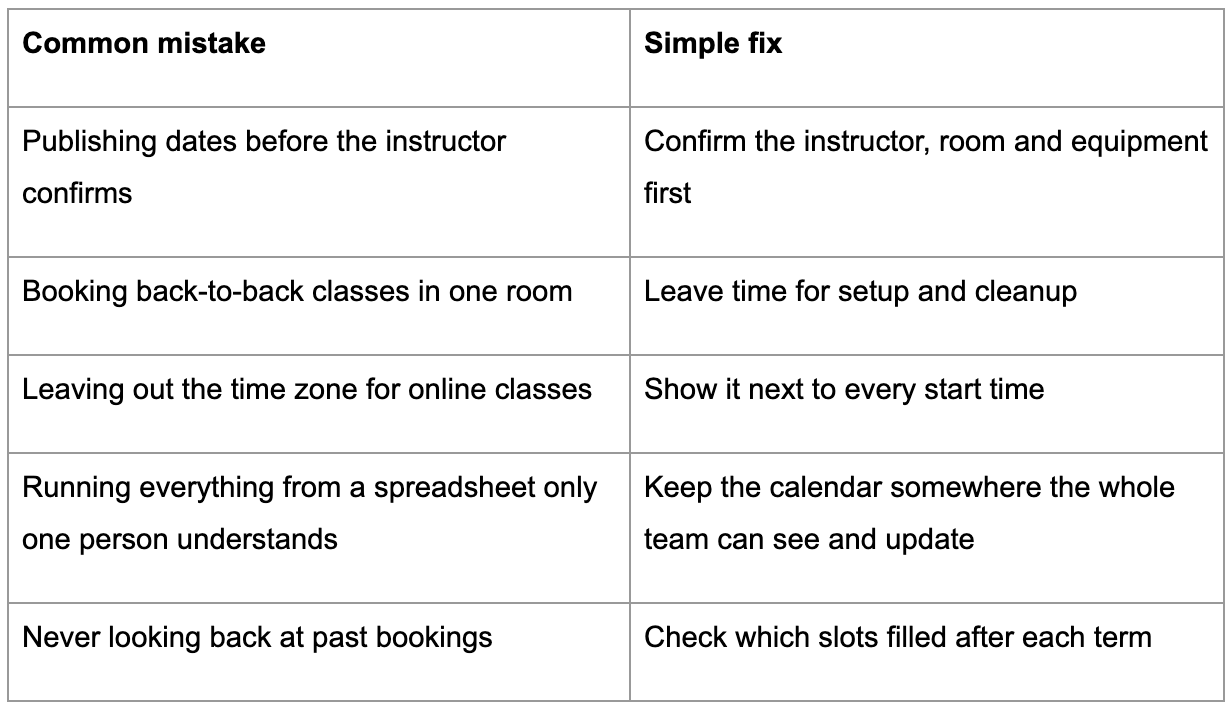
The spreadsheet problem deserves a closer look. Manual processes like this are one of the operational bottlenecks that keep small businesses stuck, and the strain tends to grow as you add more classes.
The good news is that a full calendar usually comes from small habits, kept up week after week, rather than one big change. Whether you use a spreadsheet or class scheduling software, those habits are what fill the seats.