

A partner asks for the closing set on a Friday evening, an associate sends three versions of the same agreement, and the client's general counsel wants to know who on the other side has seen the disclosure schedule. Most firms have lived some version of that evening.
A data room for legal teams puts the documents, the permissions and the activity record in one place, so those questions get answered by the system instead of from memory. This guide explains what a legal VDR does, which features solve which problems, and how a firm can roll one out without disrupting live matters.
What a Legal Data Room Does That a Shared Drive Does Not
A shared drive stores files. A legal data room also controls who may open each file, for how long and with what restrictions, and it records everything that happens along the way.
Three differences show up in daily work. Permissions can sit on a single document, so one room can serve a client, opposing counsel and an expert without duplicating folders. Access can expire on a set date. And every view, download and print attempt is logged, which matters when a question about disclosure arises months later.
Features, Explained by the Problem They Solve
Features read like a catalogue until they are tied to a real problem. This table links each one to a situation lawyers recognise.
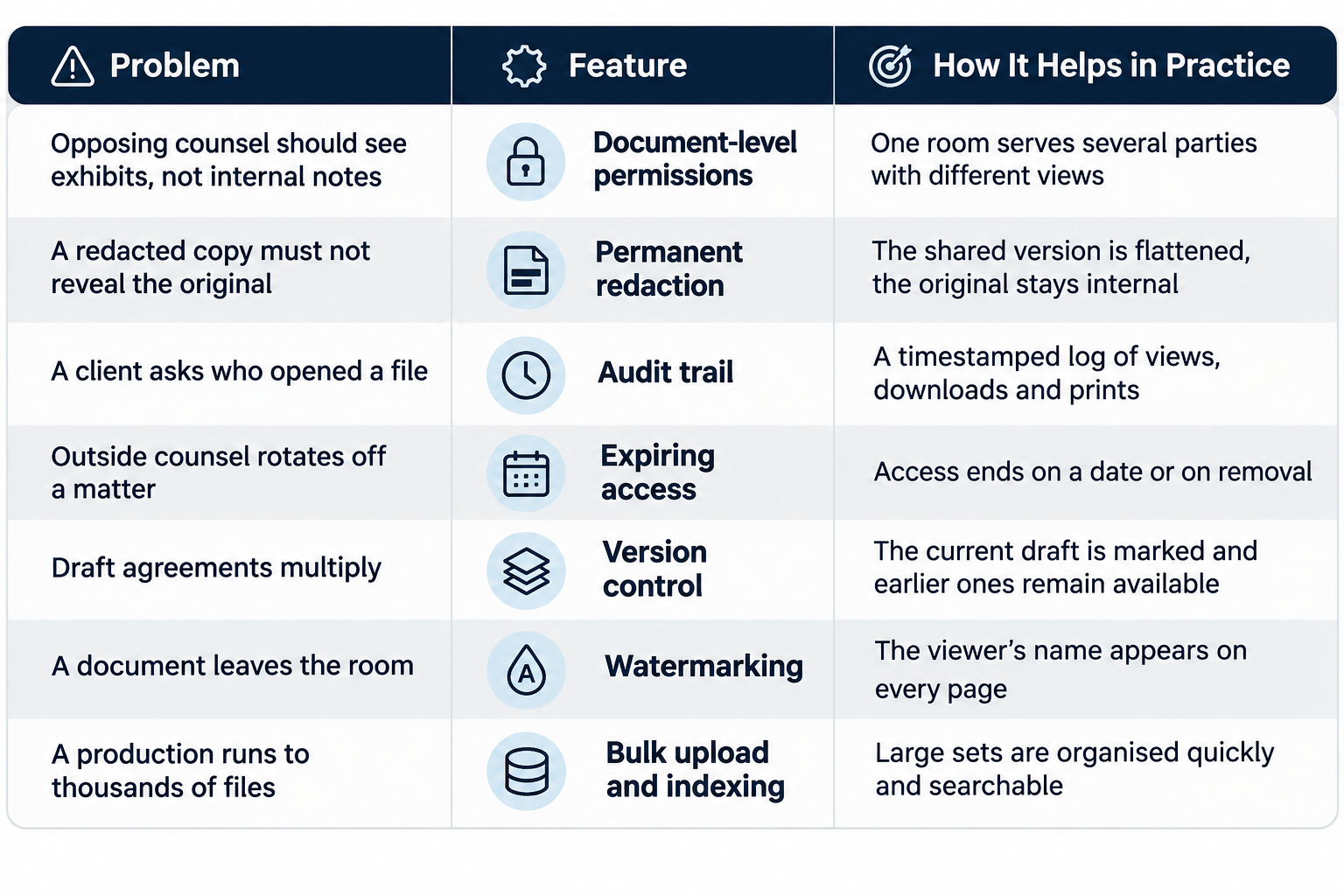
Two of these deserve a closer look. Redaction should be tested before it is trusted: copy text from a redacted area, or search for a redacted term. If either works, the redaction is cosmetic.
The audit trail earns its keep when it is read before a dispute, not after. A quick weekly look at who has opened the sensitive folders catches problems while they are still small.
Practice Areas and the Documents They Bring
Corporate and M&A
Disclosure schedules, contracts, cap tables and board minutes move between buyers, sellers, lenders and their advisers. Staged access lets a firm show summaries early and open detailed files only to bidders who advance. Q&A logs tie each question to the document behind it.
Litigation and Arbitration
Productions, exhibits and privilege review create volume and deadlines. Full-text search shortens review, and permanent redaction protects privileged passages inside otherwise producible documents. The audit trail also supports the firm's account of how a production was assembled.
Real Estate
Leases, title materials, surveys and loan documents arrive from many counterparties. Version control keeps parties from working off an outdated draft, and expiring access closes the file for lenders and brokers once the transaction completes.
Employment and Internal Investigations
Personnel files, interview notes and complaint records call for strict need-to-know access. A small named group, view-only settings and a full activity record help a firm show that sensitive material stayed contained.
Four Assumptions Worth Testing
"A data room is only for large deals." Smaller recurring matters benefit too. A saved folder template turns setup into a few minutes, and the same permission structure repeats across matters.
"Clients will resist another login." In practice clients often prefer one link and a clear view of what has been shared. A one-page guide on first use removes most friction.
"Our document management system already does this." Check whether it can give an outside party time-limited, document-level access with a log. Many internal systems were built for internal users and handle outsiders awkwardly.
"Redaction in a PDF viewer is enough." Overlays can leave the underlying text intact. Test before relying on them.
Choosing a Data Room for Legal Teams
Selection comes down to how well a platform handles the situations above, rather than how long its feature list is. Run a pilot with real documents and use these questions to compare vendors:
How granular are permissions, and can they be changed in seconds mid-matter?
Is redaction permanent in the shared copy, and can the vendor show it?
What does the audit trail capture, and can it be exported?
What are the support hours, and how fast do replies arrive outside the working day?
Where is data stored, and what happens to it when a matter closes?
Can the full file be exported at the end in a usable format?
Pricing structure shapes the decision too. Per-matter fees suit occasional use, subscriptions suit firms with recurring matters, per-user pricing grows with team size, and storage-based tiers can climb on production-heavy cases. Ask for a written list of every fee, including extended retention after a matter closes.
A 30-60-90 Day Rollout
A phased rollout keeps live work safe while the team learns the tool.
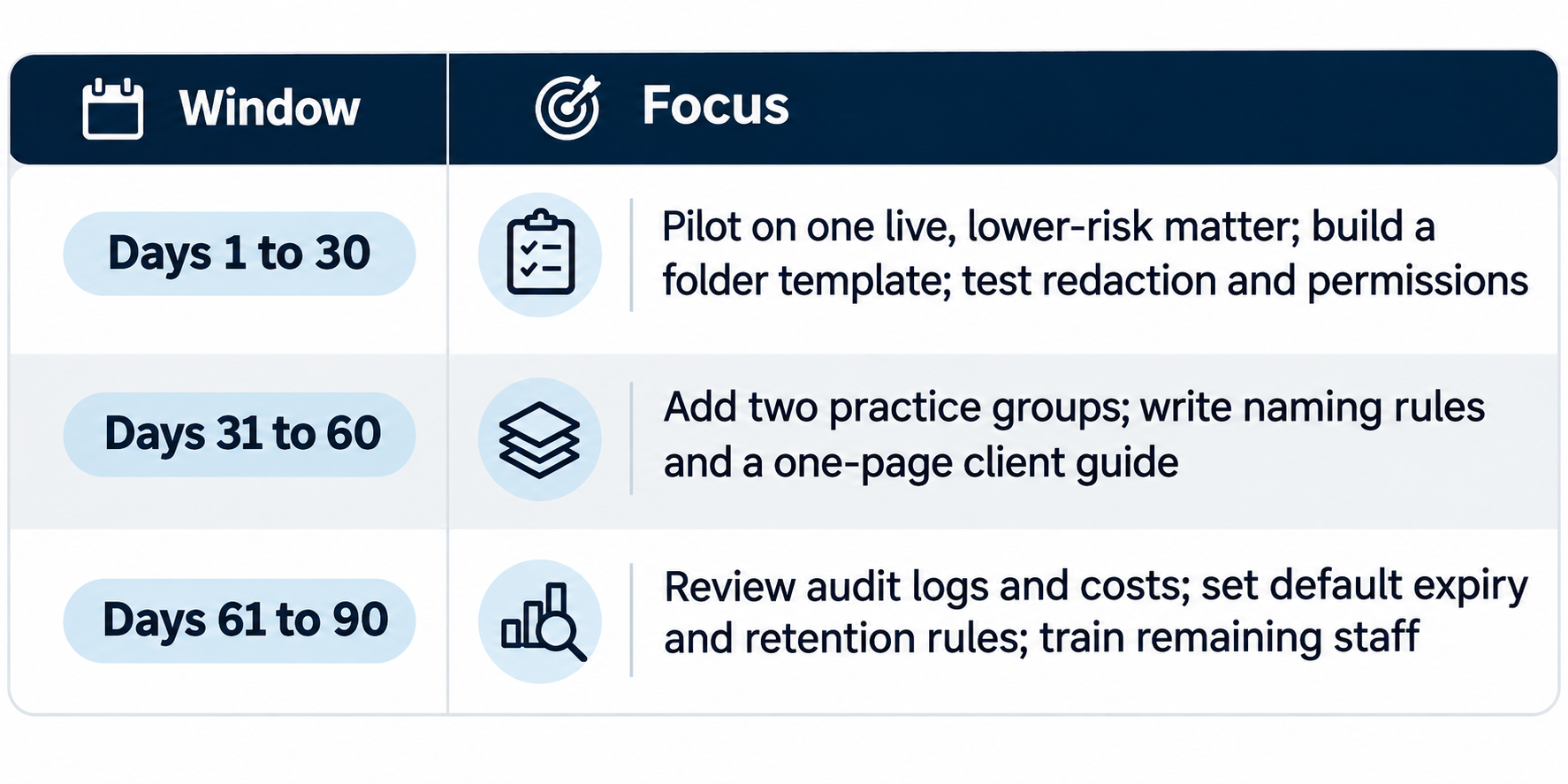
Before the first client logs in, tell them four things:
Why the firm uses a data room and what it protects
Who will have access, and for how long
How to sign in, and what the watermark on each page means
Whom to contact when someone new needs access
Starting With One Matter
Firms rarely adopt a data room firm-wide on day one. They pick a matter with enough documents to justify the setup, run it carefully and keep notes on what worked.
By the third or fourth matter, the folder templates, permission patterns and client guide are ready, and the room stops feeling like an extra task. At that point the platform fades into the background, which is where a legal tech tool belongs.
This article offers general information for law firms and is not legal advice.